Health
What does the Health page check, and what do I do about a red item?
Elly's till orders stopped arriving this morning. Before she digs into the source, she checks whether one of the services behind Vantage is down.
Health shows whether the Vantage server can reach each service it depends on. Only workspace owners and admins see it.
Open Health
Open More → Health. The page checks every service as it opens and again every 15 seconds; Refresh checks straight away.
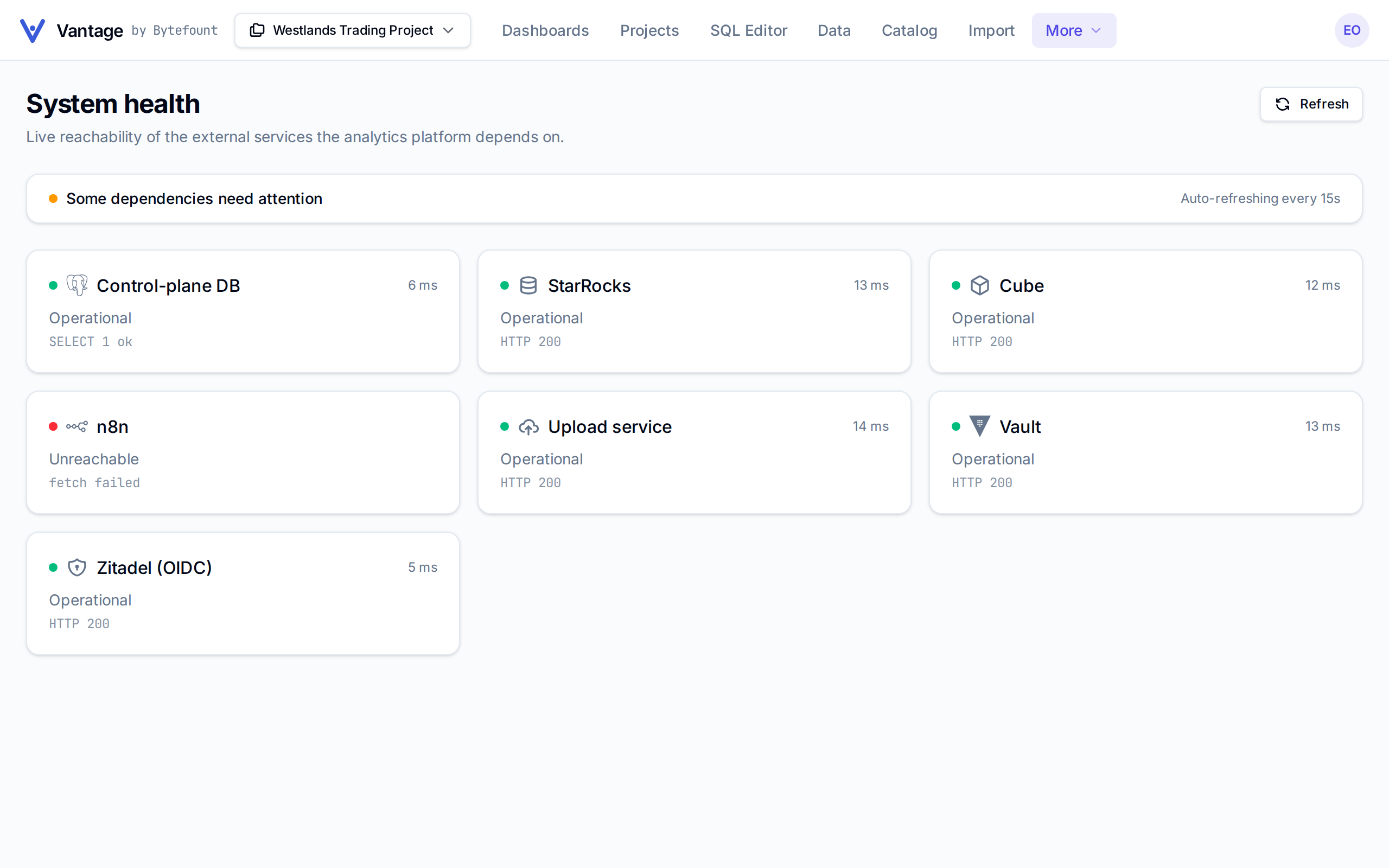
The bar at the top says All systems operational when every service answers, and Some
dependencies need attention when one does not. Each card shows a service, how long it took to
answer, and the detail of the last check, such as HTTP 200.
| Dot | Status | Means |
|---|---|---|
| Green | Operational | The service answered |
| Amber | Degraded | It answered with a server error |
| Red | Unreachable | It did not answer within 4 seconds, or could not be reached at all |
What each service does
| Service | When it is not operational |
|---|---|
| Control-plane DB | Vantage's own database of workspaces, projects, dashboards and users. Almost nothing works |
| StarRocks | The warehouse that holds your data. Charts, the SQL Editor and loads fail |
| Cube | Serves metric models. Charts built From metric and Ask Vantage fail; From SQL charts and the SQL Editor keep working |
| n8n | Runs Database (n8n) syncs. Scheduled and manual syncs stop; data already loaded stays |
| Upload service | Loads files, reads existing tables and builds modeled datasets. Uploads and syncs fail |
| Vault | Issues the warehouse logins the SQL Editor and your own dbt project use. Queries and Get credentials can fail |
| Zitadel (OIDC) | The sign-in service. Nobody can sign in |
In the example above n8n is Unreachable, which is why database syncs, like Elly's till orders, have stopped.
What to do about a red item
The services are run by whoever runs your Vantage, not from inside a workspace, so nothing on the page fixes them.
- Select Refresh after a minute. A service that is restarting comes back on its own.
- If it stays red, tell whoever runs your Vantage, with the service's name and the detail on its
card, such as
fetch failedortimeout after 4000ms. If you run Vantage yourself, see Configuration. - Once it is green, run anything that failed again: select Sync on a database source, or upload the file again.
A sync that fails while every service is green is a problem with the source itself; its row in Data shows the reason (see Connect a source).
Next
- Connect a source to rerun a sync
- Members and roles for what workspace admins can do
- Architecture for how the services fit together