Metric models
How do I define measures and dimensions once and reuse them everywhere?
Elly's team kept arguing over revenue because everyone summed it differently in their own spreadsheets. In Vantage she defines revenue once, in the Sales dataset's metric model, and every chart, question and export uses that definition.
You need the editor or admin role in the dataset's project. For a shared dataset you need to be a workspace owner or admin.
What a metric model is
Every ready dataset gets a metric model as soon as it loads. It lists the dataset's dimensions, the columns you group and filter by, such as Facility or Order Date, and its measures, the numbers you add up: a Count of rows and a sum of each numeric column, such as Revenue. Dashboard widgets, Ask Vantage and the MCP server all pick from these names, so a change here shows up everywhere they are used.
Open the model
- Open Data and expand the source's row.
- On the dataset, select Metrics.
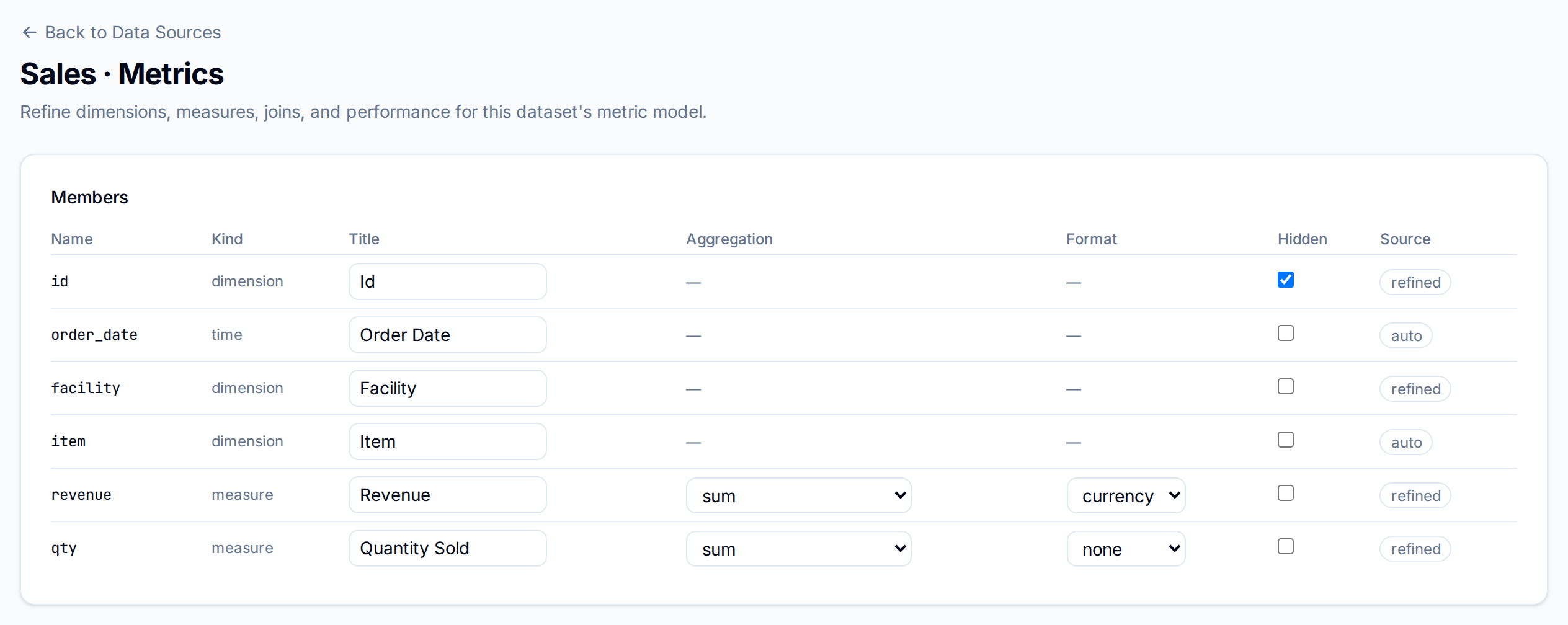
Name and format members
The Members table has a row per column.
| Column | What to set |
|---|---|
| Title | The name people see, here Revenue and Quantity Sold |
| Aggregation | For a measure: sum, avg, min, max, count_distinct or count_distinct_approx |
| Format | For a measure: currency or percent, or none |
| Hidden | Tick to keep a member out of widget pickers and AI, like id here |
Source shows auto for a member as Vantage built it and refined once someone has changed it.
Select Save at the bottom of the page. Vantage shows Saved, or a message starting "Cube would refuse this model" if the change cannot be used, and keeps the previous model.
Add a custom measure
Under Custom measures, each form adds a measure built from others:
| Form | Builds | Example |
|---|---|---|
| Add filtered measure | An aggregation over the rows that match filters | Revenue at Westlands Depot only |
| Add ratio measure | One measure divided by another | Revenue per unit: revenue ÷ qty |
| Add rolling-window measure | A measure over a trailing window, such as 7 day | Revenue over the last 7 days |
| Add running-total measure | A measure added up over time | Revenue to date |
| Add calculated measure | A SQL expression |
For example, to add revenue at one facility:
- Under Add filtered measure, enter a slug, here depot_revenue, and a title, Westlands Depot revenue.
- Choose sum, the column revenue, and the format currency.
- Choose the filter column facility, keep equals, enter Westlands Depot, and select Add filter.
- Select Add filtered measure, then Save.

The new measure appears in the list above the forms, with Remove to take it out again. As with the members table, nothing is kept until you select Save.
Joins and performance
Joins connects this dataset to another, so a chart can group the sales by a column from, say, a customers dataset. Choose the target dataset, the relationship (many_to_one, one_to_many or one_to_one), and the column on each side, then select Add join.
Performance has Speed up this dataset: tick it and choose the time dimension, and Vantage keeps a summary of the dataset by that date so charts over it answer faster.
Export downloads the model as a JSON file, for use in a pack.
Next
- Build a draft to chart the measures
- Modeled datasets to clean up a dataset before modelling it
- Ask a question to query the model in plain words